 Ferrite
Models and settings
Ferrite does not come with an AI model. You connect your own in Settings. The app keeps the secret part (your key) and the non-secret part (your choices) in different places on purpose. Some words here are new. Words we use explains them.
Providers#
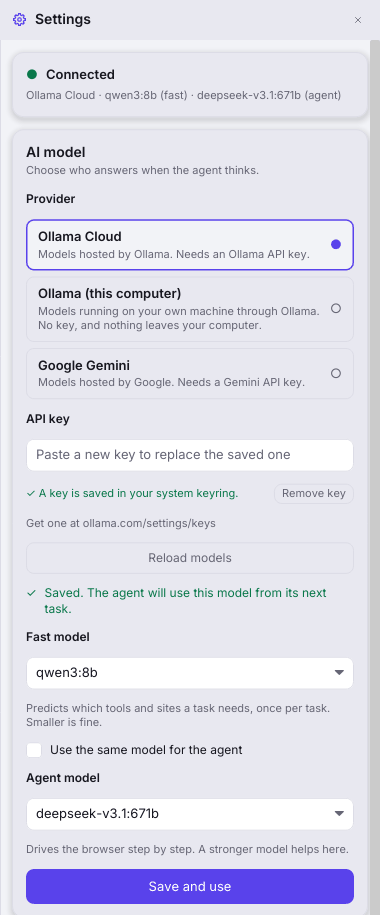
A provider is the service that runs the AI model.
| Provider | Needs a key | Where requests go | Get a key |
|---|---|---|---|
| Ollama Cloud | Yes | https://ollama.com | ollama.com/settings/keys |
| Ollama (this computer) | No, and none is sent | A server on localhost / 127.0.0.1, default http://localhost:11434 | n/a |
| Google Gemini | Yes | generativelanguage.googleapis.com | aistudio.google.com/apikey |
| Anthropic Claude | Yes | https://api.anthropic.com | console.anthropic.com/settings/keys |
| OpenAI or compatible | Yes, unless the server is on this computer | The server address you type, default https://api.openai.com/v1. OpenRouter, Groq, vLLM, LM Studio and llama.cpp's server work too. | From that provider |
OpenAI or compatible takes the server's address with its version, like https://openrouter.ai/api/v1 or http://localhost:1234/v1. Servers differ in which settings they accept. If a server refuses one by name (for example temperature or max_completion_tokens), Ferrite sends the request again without it and remembers that for later calls. Anthropic is sent no temperature, because current Claude models refuse one, and is given room of at least 1,024 output tokens, because a model that thinks spends some of them thinking. A refusal from either is treated like an empty answer, so the agent predicts nothing and asks you.
The Ollama “local” choice must be on this computer. This is on purpose. A bearer token is a secret that is sent with each request. Ferrite must never send one toward anything that is not the cloud service. Ferrite matches the whole host. So localhost.evil.example is not local. You can still use a remote Ollama server. Choose Ollama Cloud, and set FERRITE_OLLAMA_BASE_URL to that server. Your key is then sent to that server. So do this only for a server you trust.
The two models#
- Fast model
- Runs once for each task. It predicts which capabilities the task might need. A capability is a kind of thing the agent may do. The fast model sees only your request. A small, quick model is fine.
- Agent model
- Reads pages and picks each step. A stronger model helps here.
By default, one model does both jobs. No model name is built into the app. The list comes from your provider, because providers retire model names. If no name is set, you see a clear “choose a model” message. You never get an old default.
Where things are stored#
| What | Where | Notes |
|---|---|---|
| Provider, model names, local server address | settings.json in the data directory | Not secret. The data directory is $FERRITE_HOME if you set it. Otherwise it is ~/.local/share/ferrite. The file is written atomically. That means a crash cannot leave half a file. |
| API keys | Your operating system's credential store, service ferrite | The account names are OLLAMA_API_KEY, FERRITE_GEMINI_API_KEY, FERRITE_ANTHROPIC_API_KEY and FERRITE_OPENAI_API_KEY. A key is never in a file or a log. |
| Model-activity trace | logs/model-activity.jsonl in the data directory | Local only. It holds prompts and answers. See below. |
| Panel sizes, chats, bookmarks, browser profile | ui-layout.json, chats/, bookmarks.json and profile/ in the data directory | The profile (cookies, storage) is written on a clean shutdown. |
| The app's log file | A separate log folder, not the data directory | See Debugging and logs. |
The key is held more carefully than the rest#
- The settings file holds no key. A test fails if it ever does.
- The key field is masked. The field is cleared the moment the key is stored.
- The message that carries a typed key prints
<redacted>. The key type printsToken(<redacted>). So a stray debug line cannot leak the key. - Gemini puts its key in the request URL. So Ferrite hides the key in every error message from that backend before it shows the message.
- Remove key deletes the key from the credential store. It also disconnects the running app. Otherwise the app would keep using the copy in memory.
Linux: keys do not survive a restart
This build stores keys through the Linux kernel keyring. The kernel keyring is held in memory. It is cleared when the computer restarts. (macOS Keychain and Windows Credential Manager keep keys normally.) On Linux, save the key in Settings to use it in the current session. For a permanent key, export it as an environment variable:
export OLLAMA_API_KEY=<your key>
# or
export FERRITE_GEMINI_API_KEY=<your key>
Using a Secret Service backend that keeps keys after a restart is tracked as an open item.
How Settings and environment variables combine#
An exported environment variable wins over what Settings saved. CI runners and one-off shell overrides need this. It is also how Ferrite worked before Settings existed. When this happens, the Settings status card says so and names the variables.
| Variable | Meaning | Default |
|---|---|---|
FERRITE_MODEL_SMALL | The fast model's name | none (required) |
FERRITE_MODEL_MAIN | The agent model's name | none (required) |
OLLAMA_API_KEY | Ollama Cloud key (overrides the keyring) | none |
FERRITE_GEMINI_API_KEY | Gemini key (overrides the keyring) | none |
FERRITE_ANTHROPIC_API_KEY | Anthropic key (overrides the keyring) | none |
FERRITE_OPENAI_API_KEY | OpenAI-compatible key (overrides the keyring) | none |
FERRITE_OLLAMA_BASE_URL | Ollama endpoint | https://ollama.com |
FERRITE_GEMINI_BASE_URL | Gemini endpoint | https://generativelanguage.googleapis.com/v1beta/models |
FERRITE_ANTHROPIC_BASE_URL | Anthropic endpoint (no /v1) | https://api.anthropic.com |
FERRITE_OPENAI_BASE_URL | OpenAI-compatible endpoint (with its version) | https://api.openai.com/v1 |
FERRITE_MODEL_CALL_BUDGET | Most model calls in a run | 500 |
FERRITE_MODEL_MAX_IN_FLIGHT | Model requests at the same time | 2 |
FERRITE_MODEL_TIMEOUT_SECS | Timeout for each request | 60 |
FERRITE_MODEL_MAX_RESPONSE_BYTES | Largest response accepted | 1 MiB |
FERRITE_MODEL_CACHE_DIR | On-disk response cache. A cache is a store of earlier answers, so the same question is not asked twice. | ~/.cache/ferrite-model |
FERRITE_HOME | The data directory | ~/.local/share/ferrite |
FERRITE_DEFENSE | on, off, sanitizer_only or loop_only, for experiments | on |
FERRITE_LAYA_URL | Optional fast-lane server (see below) | unset (off) |
Suppose you chose no provider in Settings. Then the environment and the keyring alone decide, as before. Ferrite uses Ollama if a key (or a local server) is set up. Otherwise it uses Gemini.
Browser identity#
Websites decide what to send you, and whether to let you sign in. They decide partly from the User-Agent, a text that a browser sends to name itself. Servo's own text names its engine (Servo/<version>). Sign-in pages often treat an engine they do not know as an unsupported browser. Settings → Compatibility chooses what Ferrite says:
- Firefox-compatible
- The default. It is Servo's own text, with one change. The
Servo/<version>token is replaced by theGeckotoken that Firefox sends. Servo already claimsFirefox/<n>. Nothing else is made up. Every mainstream browser follows this long-standing habit. - Ferrite (names its engine)
- Servo's own text, unchanged. It is honest, but some sites will refuse to sign you in.
The engine is built once for each process. So a change applies the next time you open Ferrite. FERRITE_USER_AGENT still overrides both choices.
What this does not do
It does not fake hardware, canvas or WebGL renderer details, plugin lists or client hints. It does not hide that a page is being automated. It does not pretend to be Chrome. Ferrite has none of Chrome's client hints, so that would be a contradiction that a site could see. Ferrite reports what the engine is and can do. The engine itself gained WebGL and WebGL2, navigator.permissions, Notification and the async clipboard. These are real implementations. Sites and sign-in scripts look for them.
What leaves your machine#
- Page content, to your model provider. The agent has to read pages to act. So the text it reads is sent to the provider you chose. With local Ollama, nothing leaves your computer.
- Your request, to the fast model, to predict the fingerprint. The fingerprint is the list of tools and websites the task is expected to need. Only text you wrote is sent. Page text is never sent.
- The model list request, when you press Load models. Your key (or no key, for local) goes to the provider you chose. Nothing else goes.
- Nothing to Ferrite. There is no Ferrite server. The source has no analytics or telemetry code. The app makes one kind of request on its own, apart from what you ask it to do. It fetches each site's
favicon.ico. It does this for the six quick-access tiles on the new-tab page and for the tabs you open.
The model-activity trace stays on your disk. It can contain prompts and page text. Treat the data directory with care.
Failing safely#
If there is no model, a bad key, a timeout or a malformed answer, the defense never gets weaker. The prediction layer of the fingerprint fails to empty. That sends more actions to consent. The agent loop fails closed. That means it refuses to act without a model. If you save a configuration that cannot be built, Ferrite refuses it and gives the reason. The previous working connection stays as it was.
Using a model for the live evaluation#
The live runner uses the same model layer and the same keys. It reads OLLAMA_API_KEY, FERRITE_GEMINI_API_KEY, FERRITE_ANTHROPIC_API_KEY or FERRITE_OPENAI_API_KEY, or the OS keyring. --provider is ollama, gemini, anthropic, openai or mock; --base-url points openai at another compatible server. You never pass a key as a flag. A model tag has no default. You pass --model TAG for both roles, or --small-model and --main-model. A local Ollama needs no key. Add --base-url http://localhost:11434 for it.
This is a command like the one the owner used for the live run with ollama gemma4:31b. The owner ran it in batches of 100 cases. The first batch used the default --max-calls of 100, which stopped after 18 cases. The value 800 below is a suggestion for finishing a batch of 100 cases. It is not a recorded value:
$ just live-eval --provider ollama --model gemma4:31b --corpus all --seed 1 --batch-size 100 --max-calls 800 --pause-ms 2000Tip: --batch-size and --max-calls count different things
--batch-size counts cases. --max-calls counts model calls, and the default is 100. One case can need several calls. So 100 cases can need more than the default 100 calls. A value of 800 should let a batch of 100 cases finish.
The exit codes are:
0: the batch is done. Go on to the next batch.3: the--max-callscap was reached. Nothing is lost. Run the same command again, or raise the cap.4: the provider kept failing, for example from a rate limit. A rate limit is a cap on how many requests the provider accepts in a period of time. Wait, then run the same command again.5: the batch finished, but some cases failed. Use--retry-failedafter a pause.
Codes 1 (an internal failure) and 2 (a usage or configuration problem) also exist. Run it from source has the full table. Live evaluation explains the method.
Laya: an optional fast lane#
Laya is a small local decision model. Suppose you set FERRITE_LAYA_URL. Then an optional, separate server can pick routine browsing steps. It uses a confidence gate, which means it acts only when it is sure enough. This saves model calls. It is never part of the security boundary. Every step it picks still goes through the same guard and consent as any other step. The guard is the check that stops an action outside the predicted list. The app logs, once, whether Laya is on. If the server is not on this machine, the app also logs that page text, URLs and element labels leave the machine. A governor, which is a built-in control rule, pauses the lane by itself when it stops paying off. If the variable is unset, none of this exists.